Measure how many beers we are drinking so we can split the cost of the kegs.
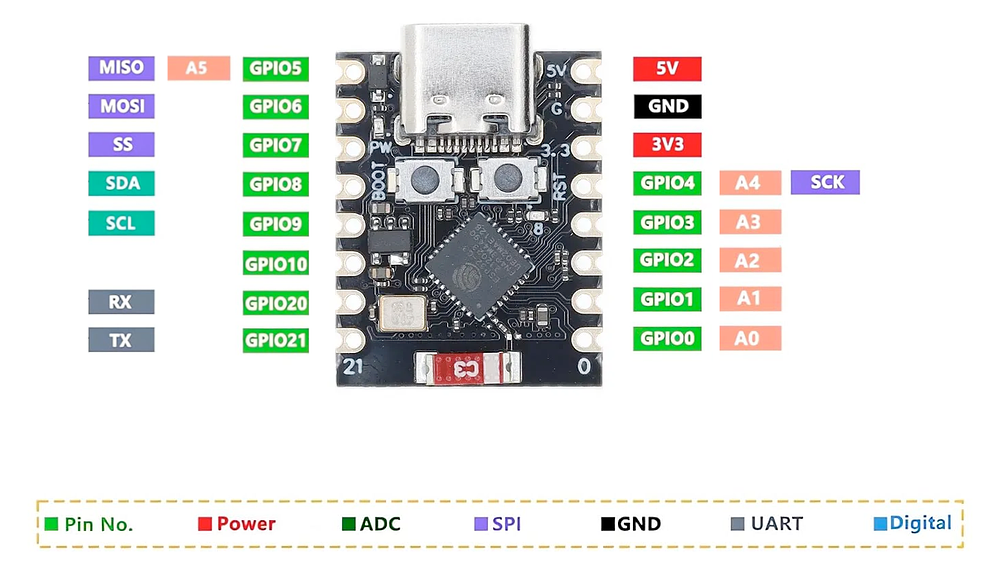
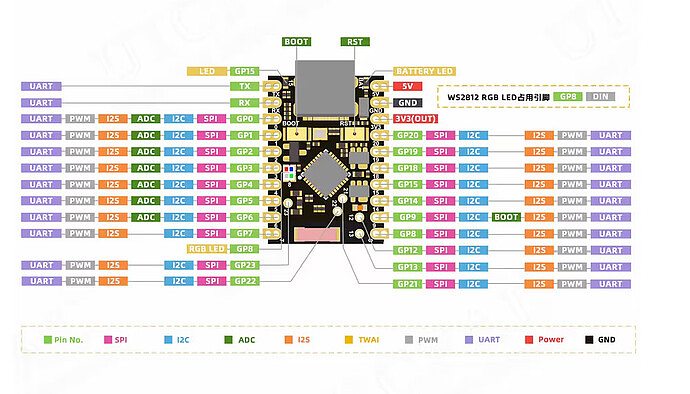
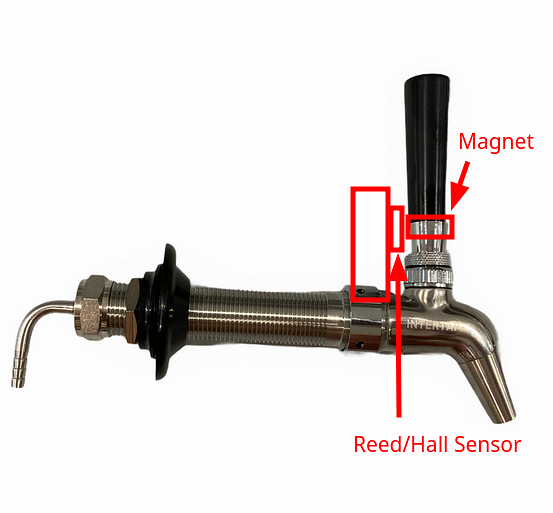
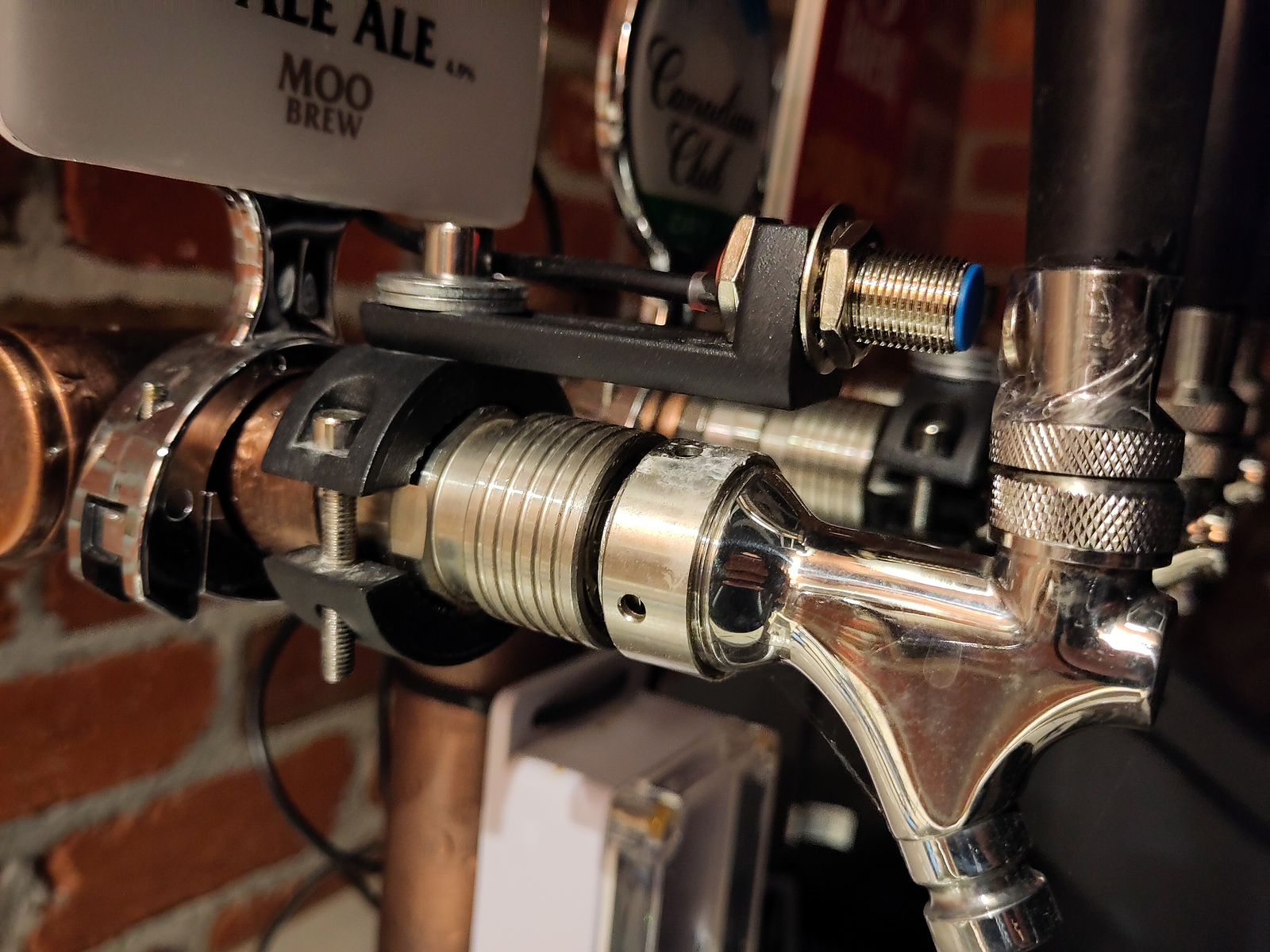
We will use a reed sensor on each tap with a magnet on the actual tap. The reed sensor connects to the ESP32-C3-Supermini which will have WIFI + OTA + MQTT abilities.
Over The Air (OTA) for sending code remotely.
MQTT for sending the data over the network for many services to use.
We can measure how long the reed sensor has been split away and roughly know if it was a small beer or large beer.
Michael swapped over to the C6 for the Beer program
image3.png331 KB
Initial code
WIFI + OTA as an initial beginning.
C
#include<WiFi.h>
#include<ESPmDNS.h>
#include<WiFiUdp.h>
#include<ArduinoOTA.h>constchar*ssid="CHANGEME";constchar*password="CHANGEME";// LEDSconstintled=8;// ESP32 Pin to which onboard LED is connectedunsignedlongpreviousMillis=0;// will store last time LED was updatedconstlonginterval=2000;// interval at which to blink (milliseconds)intledState=LOW;// ledState used to set the LEDvoidsetup(){pinMode(led,OUTPUT);Serial.begin(115200);Serial.println("Booting");WiFi.mode(WIFI_STA);WiFi.begin(ssid,password);while(WiFi.waitForConnectResult()!=WL_CONNECTED){Serial.println("Connection Failed! Rebooting...");delay(5000);ESP.restart();}ArduinoOTA.onStart([](){Stringtype;if(ArduinoOTA.getCommand()==U_FLASH)type="sketch";else// U_SPIFFStype="filesystem";// NOTE: if updating SPIFFS this would be the place to unmount SPIFFS using SPIFFS.end()Serial.println("Start updating "+type);}).onEnd([](){Serial.println("\nEnd");}).onProgress([](unsignedintprogress,unsignedinttotal){Serial.printf("Progress: %u%%\r",(progress/(total/100)));}).onError([](ota_error_terror){Serial.printf("Error[%u]: ",error);if(error==OTA_AUTH_ERROR)Serial.println("Auth Failed");elseif(error==OTA_BEGIN_ERROR)Serial.println("Begin Failed");elseif(error==OTA_CONNECT_ERROR)Serial.println("Connect Failed");elseif(error==OTA_RECEIVE_ERROR)Serial.println("Receive Failed");elseif(error==OTA_END_ERROR)Serial.println("End Failed");});ArduinoOTA.begin();Serial.println("Ready");Serial.print("IP address: ");Serial.println(WiFi.localIP());}voidloop(){ArduinoOTA.handle();//loop to blink without delayunsignedlongcurrentMillis=millis();if(currentMillis-previousMillis>=interval){// save the last time you blinked the LEDpreviousMillis=currentMillis;// if the LED is off turn it on and vice-versa:ledState=not(ledState);// set the LED with the ledState of the variable:digitalWrite(led,ledState);}}
// LEDSconstintled=8;// ESP32 Pin to which onboard LED is connectedunsignedlongpreviousMillis=0;// will store last time LED was updatedconstlonginterval=2000;// interval at which to blink (milliseconds)intledState=HIGH;// ledState used to set the LED HIGH = OFF, LOW = ON/* Reed Sensor */intreedSensorPin=3;intstate=0;intcounter=0;booleanlastReedState=false;intreedTimeout=0;booleanreedTriggered=false;
}voidloop(){ArduinoOTA.handle();/* Reed Sensor */state=digitalRead(reedSensorPin);/* reedTimeout (20 = 1sec) */if(reedTriggered==true&&reedTimeout<100){/* do nothing / debounce */}else{if(state==LOW&&lastReedState==HIGH){/* Piece is placed on sensor */counter++;delay(50);reedTriggered=true;}elseif(state==HIGH){/* Piece is removed from sensor */reedTimeout=0;}}digitalWrite(led,state);reedTimeout++;lastReedState=state;}voidloop(){ArduinoOTA.handle();/* Reed Sensor */state=digitalRead(reedSensorPin);/* reedTimeout (20 = 1sec) */if(reedTriggered==true&&reedTimeout<100){/* do nothing / debounce */}else{if(state==LOW&&lastReedState==HIGH){/* Piece is placed on sensor */counter++;delay(50);reedTriggered=true;}elseif(state==HIGH){/* Piece is removed from sensor */reedTimeout=0;}}digitalWrite(led,state);reedTimeout++;lastReedState=state;}voidloop(){ArduinoOTA.handle();/* Reed Sensor */state=digitalRead(reedSensorPin);/* reedTimeout (20 = 1sec) */if(reedTriggered==true&&reedTimeout<100){/* do nothing / debounce */}else{if(state==LOW&&lastReedState==HIGH){/* Piece is placed on sensor */counter++;delay(50);reedTriggered=true;}elseif(state==HIGH){/* Piece is removed from sensor */reedTimeout=0;}}digitalWrite(led,state);reedTimeout++;lastReedState=state;}voidloop(){ArduinoOTA.handle();/* Reed Sensor */state=digitalRead(reedSensorPin);/* reedTimeout (20 = 1sec) */if(reedTriggered==true&&reedTimeout<100){/* do nothing / debounce */}else{if(state==LOW&&lastReedState==HIGH){/* Piece is placed on sensor */counter++;delay(50);reedTriggered=true;}elseif(state==HIGH){/* Piece is removed from sensor */reedTimeout=0;}}digitalWrite(led,state);reedTimeout++;lastReedState=state;}voidloop(){ArduinoOTA.handle();/* Reed Sensor */state=digitalRead(reedSensorPin);/* reedTimeout (20 = 1sec) */if(reedTriggered==true&&reedTimeout<100){/* do nothing / debounce */}else{if(state==LOW&&lastReedState==HIGH){/* Piece is placed on sensor */counter++;delay(50);reedTriggered=true;}elseif(state==HIGH){/* Piece is removed from sensor */reedTimeout=0;}}digitalWrite(led,state);reedTimeout++;lastReedState=state;}
Updated loop
C
voidloop(){ArduinoOTA.handle();/* Reed Sensor */state=digitalRead(reedSensorPin);/* reedTimeout (20 = 1sec) */if(reedTriggered==true&&reedTimeout<100){/* do nothing / debounce */}else{if(state==LOW&&lastReedState==HIGH){/* Piece is placed on sensor */counter++;delay(50);reedTriggered=true;}elseif(state==HIGH){/* Piece is removed from sensor */reedTimeout=0;}}digitalWrite(led,state);reedTimeout++;lastReedState=state;}
Conclusion
Waterproof
Smashing glass very fragile
Sometimes work
Hall Effect
Hall Effect Sensor
Arduino
Color
Ground (G pin)
GND
Black
VCC (V pin)
5V
Red
Data (S pin)
D3
White
Initialise variables
C
/* Hall Sensor */inthallSensorPin=3;intled=8;intstate=0;intcounter=0;booleanlastHallState=false;inthallTimeout=0;booleanhallTriggered=false;
Within Setup
C
pinMode(led,OUTPUT);digitalWrite(led,ledState);
Loop
C
voidloop(){ArduinoOTA.handle();/* Hall Sensor */state=digitalRead(hallSensorPin);/* hallTimeout (20 = 1sec) */if(hallTriggered==true&&hallTimeout<100){/* do nothing */}else{if(state==LOW&&lastHallState==HIGH){/* Piece is placed on sensor */counter++;delay(50);hallTriggered=true;}elseif(state==HIGH){/* Piece is removed from sensor */hallTimeout=0;}}digitalWrite(led,state);hallTimeout++;lastHallState=state;}
Converts analogue to HIGH or LOW, this can help get rid of debounce.
Setup MQTT
(Cheat off lightning sensor project REF: Modbus & weather)
Lightning Sensor Project
C
/*
Basic ESP8266 MQTT example
This sketch demonstrates the capabilities of the pubsub library in combination
with the ESP8266 board/library.
It connects to an MQTT server then:
- publishes "hello world" to the topic "outTopic" every two seconds
- subscribes to the topic "inTopic", printing out any messages
it receives. NB - it assumes the received payloads are strings not binary
- If the first character of the topic "inTopic" is an 1, switch ON the ESP Led,
else switch it off
It will reconnect to the server if the connection is lost using a blocking
reconnect function. See the 'mqtt_reconnect_nonblocking' example for how to
achieve the same result without blocking the main loop.
To install the ESP8266 board, (using Arduino 1.6.4+):
- Add the following 3rd party board manager under "File -> Preferences -> Additional Boards Manager URLs":
http://arduino.esp8266.com/stable/package_esp8266com_index.json
- Open the "Tools -> Board -> Board Manager" and click install for the ESP8266"
- Select your ESP8266 in "Tools -> Board"
Add Libraries
- WiFi
- PubSubClient by Nick O'Leary
*/#include<WiFi.h>
#include<PubSubClient.h>// Update these with values suitable for your network.constchar*ssid="YOUR SSID";constchar*password="YOUR PASSWORD";constchar*mqtt_server="10.1.1.11";WiFiClientespClient;PubSubClientclient(espClient);unsignedlonglastMsg=0;#define MSG_BUFFER_SIZE (50)
charmsg[MSG_BUFFER_SIZE];intvalue=0;voidsetup_wifi(){delay(10);// We start by connecting to a WiFi networkSerial.println("Connecting to ");Serial.println(ssid);WiFi.mode(WIFI_STA);WiFi.begin(ssid,password);while(WiFi.status()!=WL_CONNECTED){delay(500);Serial.print(".");}// Random number on payload?randomSeed(micros());Serial.println("\nWiFi connected");Serial.println("IP address: ");Serial.println(WiFi.localIP());}voidcallback(char*topic,byte*payload,unsignedintlength){Serial.print("Message arrived [");Serial.print(topic);Serial.print("] ");for(inti=0;i<length;i++){Serial.print((char)payload[i]);}Serial.println();}voidreconnect(){// Loop until we're reconnectedwhile(!client.connected()){Serial.print("Attempting MQTT connection...");// Create a random client IDStringclientId="ESP8266Client-";clientId+=String(random(0xffff),HEX);// Attempt to connectif(client.connect(clientId.c_str())){Serial.println("connected");}else{Serial.print("failed, rc=");Serial.print(client.state());Serial.println(" try again in 5 seconds");// Wait 5 seconds before retryingdelay(5000);}}}voidsetup(){Serial.begin(115200);setup_wifi();client.setServer(mqtt_server,1883);client.setCallback(callback);}voidloop(){if(!client.connected()){reconnect();}client.loop();unsignedlongnow=millis();if(now-lastMsg>2000){lastMsg=now;++value;snprintf(msg,MSG_BUFFER_SIZE,"hello world #%ld",value);Serial.print("Publish message: ");Serial.println(msg);client.publish("/hello",msg);}}
WIFI + OTA + MQTT TEMPLATE
C
#include<WiFi.h>
#include<ESPmDNS.h>
#include<WiFiUdp.h>
#include<ArduinoOTA.h> /* Over The Air */
#include<PubSubClient.h> /* MQTT *//* ----------------------------------------------------------------- *//* WIFI *//* ----------------------------------------------------------------- */constchar*ssid="CHANGEME";constchar*password="CHANGEME";/* ----------------------------------------------------------------- *//* LEDS *//* ----------------------------------------------------------------- */constintled=8;// ESP32 Pin to which onboard LED is connectedunsignedlongpreviousMillis=0;// will store last time LED was updatedconstlonginterval=2000;// interval at which to blink (milliseconds)intledState=HIGH;// ledState used to set the LED HIGH = OFF, LOW = ON/* ----------------------------------------------------------------- *//* MQTT *//* ----------------------------------------------------------------- */constchar*mqtt_server="10.1.1.11";WiFiClientespClient;PubSubClientclient(espClient);unsignedlonglastMsg=0;#define MSG_BUFFER_SIZE (50)
charmsg[MSG_BUFFER_SIZE];intvalue=0;/* MQTT Callback */voidcallback(char*topic,byte*payload,unsignedintlength){Serial.print("Message arrived [");Serial.print(topic);Serial.print("] ");for(inti=0;i<length;i++){Serial.print((char)payload[i]);}Serial.println();}/* MQTT Reconnect to Server */voidreconnect(){// Loop until we're reconnectedwhile(!client.connected()){Serial.print("Attempting MQTT connection...");// Create a random client IDStringclientId="ESP8266Client-";clientId+=String(random(0xffff),HEX);// Attempt to connectif(client.connect(clientId.c_str())){Serial.println("connected");}else{Serial.print("failed, rc=");Serial.print(client.state());Serial.println(" try again in 5 seconds");// Wait 5 seconds before retryingdelay(5000);}}}/* ----------------------------------------------------------------- */voidsetup(){pinMode(led,OUTPUT);digitalWrite(led,ledState);Serial.begin(115200);Serial.println("Booting");WiFi.mode(WIFI_STA);WiFi.begin(ssid,password);while(WiFi.waitForConnectResult()!=WL_CONNECTED){Serial.println("Connection Failed! Rebooting...");delay(5000);ESP.restart();}ArduinoOTA.onStart([](){Stringtype;if(ArduinoOTA.getCommand()==U_FLASH)type="sketch";else// U_SPIFFStype="filesystem";// NOTE: if updating SPIFFS this would be the place to unmount SPIFFS using SPIFFS.end()Serial.println("Start updating "+type);}).onEnd([](){Serial.println("\nEnd");}).onProgress([](unsignedintprogress,unsignedinttotal){Serial.printf("Progress: %u%%\r",(progress/(total/100)));}).onError([](ota_error_terror){Serial.printf("Error[%u]: ",error);if(error==OTA_AUTH_ERROR)Serial.println("Auth Failed");elseif(error==OTA_BEGIN_ERROR)Serial.println("Begin Failed");elseif(error==OTA_CONNECT_ERROR)Serial.println("Connect Failed");elseif(error==OTA_RECEIVE_ERROR)Serial.println("Receive Failed");elseif(error==OTA_END_ERROR)Serial.println("End Failed");});ArduinoOTA.begin();Serial.println("Ready");Serial.print("IP address: ");Serial.println(WiFi.localIP());/* MQTT Connect and Setup callback */client.setServer(mqtt_server,1883);client.setCallback(callback);}voidloop(){ArduinoOTA.handle();/* MQTT */if(!client.connected()){reconnect();}client.loop();unsignedlongnow=millis();if(now-lastMsg>2000){lastMsg=now;++value;snprintf(msg,MSG_BUFFER_SIZE,"hello world #%ld",value);Serial.print("Publish message: ");Serial.println(msg);client.publish("/hello",msg);}}
Setup MQTT Server
Install mosquitto (on AVA 10.1.1.11)
$ sudo apt install mosquitto mosquitto-clients
Setup to listen
Add the following to /etc/mosquitto/mosquitto.conf
#!/usr/bin/env python3
importsysimportpaho.mqtt.clientaspahodefmessage_handling(client,userdata,msg):print(f"{msg.topic}: {msg.payload.decode()}")client=paho.Client(paho.CallbackAPIVersion.VERSION2)client.on_message=message_handlingifclient.connect("10.1.1.11",1883,60)!=0:print("Couldn't connect to the mqtt broker")sys.exit(1)client.subscribe("/hello")try:print("Press CTRL+C to exit...")client.loop_forever()exceptException:print("Caught an Exception, something went wrong...")finally:print("Disconnecting from the MQTT broker")client.disconnect()
Beer Monitoring Over MQTT
WIFI + OTA + MQTT + REED
#include <WiFi.h>
#include <ESPmDNS.h>
#include <WiFiUdp.h>
#include <ArduinoOTA.h> /* Over The Air */
#include <PubSubClient.h> /* MQTT */
/* ----------------------------------------------------------------- */
/* WIFI */
/* ----------------------------------------------------------------- */
const char* ssid = "CHANGEME";
const char* password = "CHANGEME";
/* ----------------------------------------------------------------- */
/* LEDS */
/* ----------------------------------------------------------------- */
const int led = 8; // ESP32 Pin to which onboard LED is connected
unsigned long previousMillis = 0; // will store last time LED was updated
const long interval = 2000; // interval at which to blink (milliseconds)
int ledState = HIGH; // ledState used to set the LED HIGH = OFF, LOW = ON
/* ----------------------------------------------------------------- */
/* Reed Sensor */
/* ----------------------------------------------------------------- */
int reedSensorPin = 3;
int state = 0;
int counter = 0;
boolean lastReedState = false;
int reedTimeout = 0;
boolean reedTriggered = false;
/* ----------------------------------------------------------------- */
/* MQTT */
/* ----------------------------------------------------------------- */
const char* mqtt_server = "10.1.1.11";
WiFiClient espClient;
PubSubClient client(espClient);
unsigned long lastMsg = 0;
#define MSG_BUFFER_SIZE (50)
char msg[MSG_BUFFER_SIZE];
int value = 0;
/* MQTT Callback */
void callback(char* topic, byte* payload, unsigned int length) {
Serial.print("Message arrived [");
Serial.print(topic);
Serial.print("] ");
for (int i = 0; i < length; i++) {
Serial.print((char)payload[i]);
}
Serial.println();
}
/* MQTT Reconnect to Server */
void reconnect() {
// Loop until we're reconnected
while (!client.connected()) {
Serial.print("Attempting MQTT connection...");
// Create a random client ID
String clientId = "ESP8266Client-";
clientId += String(random(0xffff), HEX);
// Attempt to connect
if (client.connect(clientId.c_str())) {
Serial.println("connected");
} else {
Serial.print("failed, rc=");
Serial.print(client.state());
Serial.println(" try again in 5 seconds");
// Wait 5 seconds before retrying
delay(5000);
}
}
}
/* ----------------------------------------------------------------- */
void setup() {
  pinMode(reedSensorPin, INPUT_PULLUP);

 pinMode(led,OUTPUT);
 digitalWrite(led, ledState);
Serial.begin(115200);
Serial.println("Booting");
WiFi.mode(WIFI_STA);
WiFi.begin(ssid, password);
while (WiFi.waitForConnectResult() != WL_CONNECTED) {
Serial.println("Connection Failed! Rebooting...");
delay(5000);
ESP.restart();
}
ArduinoOTA
.onStart([]() {
String type;
if (ArduinoOTA.getCommand() == U_FLASH)
type = "sketch";
else // U_SPIFFS
type = "filesystem";
// NOTE: if updating SPIFFS this would be the place to unmount SPIFFS using SPIFFS.end()
Serial.println("Start updating " + type);
})
.onEnd([]() {
Serial.println("\nEnd");
})
.onProgress([](unsigned int progress, unsigned int total) {
Serial.printf("Progress: %u%%\r", (progress / (total / 100)));
})
.onError([](ota_error_t error) {
Serial.printf("Error[%u]: ", error);
if (error == OTA_AUTH_ERROR) Serial.println("Auth Failed");
else if (error == OTA_BEGIN_ERROR) Serial.println("Begin Failed");
else if (error == OTA_CONNECT_ERROR) Serial.println("Connect Failed");
else if (error == OTA_RECEIVE_ERROR) Serial.println("Receive Failed");
else if (error == OTA_END_ERROR) Serial.println("End Failed");
});
ArduinoOTA.begin();
Serial.println("Ready");
Serial.print("IP address: ");
Serial.println(WiFi.localIP());
/* MQTT Connect and Setup callback */
client.setServer(mqtt_server, 1883);
client.setCallback(callback);
}
void loop() {
ArduinoOTA.handle();
/* Reed Sensor */
state = digitalRead(reedSensorPin);
/* reedTimeout (20 = 1sec) */
if (reedTriggered == true && reedTimeout < 100){
/* do nothing / debounce */
}else{
if (state == LOW && lastReedState == HIGH) {
/* Piece is placed on sensor */
counter++;
delay(50);
reedTriggered = true;
}
else if(state == HIGH) {
/* Piece is removed from sensor */
reedTimeout=0;
}
}
digitalWrite(led, state);
reedTimeout++;
lastReedState = state;
/* MQTT */
if (!client.connected()) {
reconnect();
}
client.loop();
unsigned long now = millis();
if (now - lastMsg > 2000) {
lastMsg = now;
++value;
snprintf (msg, MSG_BUFFER_SIZE, "hello world #%ld", value);
Serial.print("Publish message: ");
Serial.println(msg);
client.publish("/beer/michael/tap1", msg);
}
}
MQTT Format of messages
NOTE: We want to publish to the following
/beer/michael/tap1
/beer/michael/tap2
/beer/michael/tap3
/beer/adam/tap1
/beer/adam/tap2
/beer/adam/tap3
Where the taps should be the same on each side. EG: tap1 should be Moo Brew on both sides, referring to the same KEG. This way when measuring the seconds of use between users we can work out a percentage of the KEG.
It should send the message as the amount of seconds in which the pour took, ie: away from the magnet.
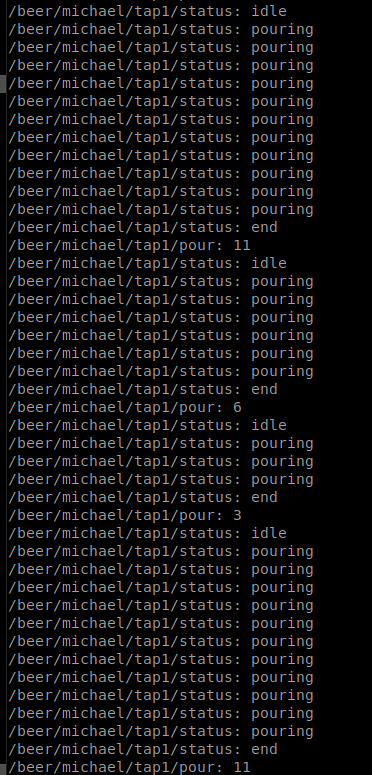
For each tap we should have two published routes /status & /pour (in 100ms), eg;
/beer/michael/tap1/status
/beer/michael/tap1/pour
Scenario
Step
Description
Status
Pour
1
Tap1 is idle (reed is seeing the magnet)
idle
0
2
Someone starts pouring a beer, reed switch loses magnet
pouring
1,2,3,4,5 counting
3
Finish pouring (reed connects to magnet)
end
6
4
Tap1 is idle again (on the next loop)
idle
0
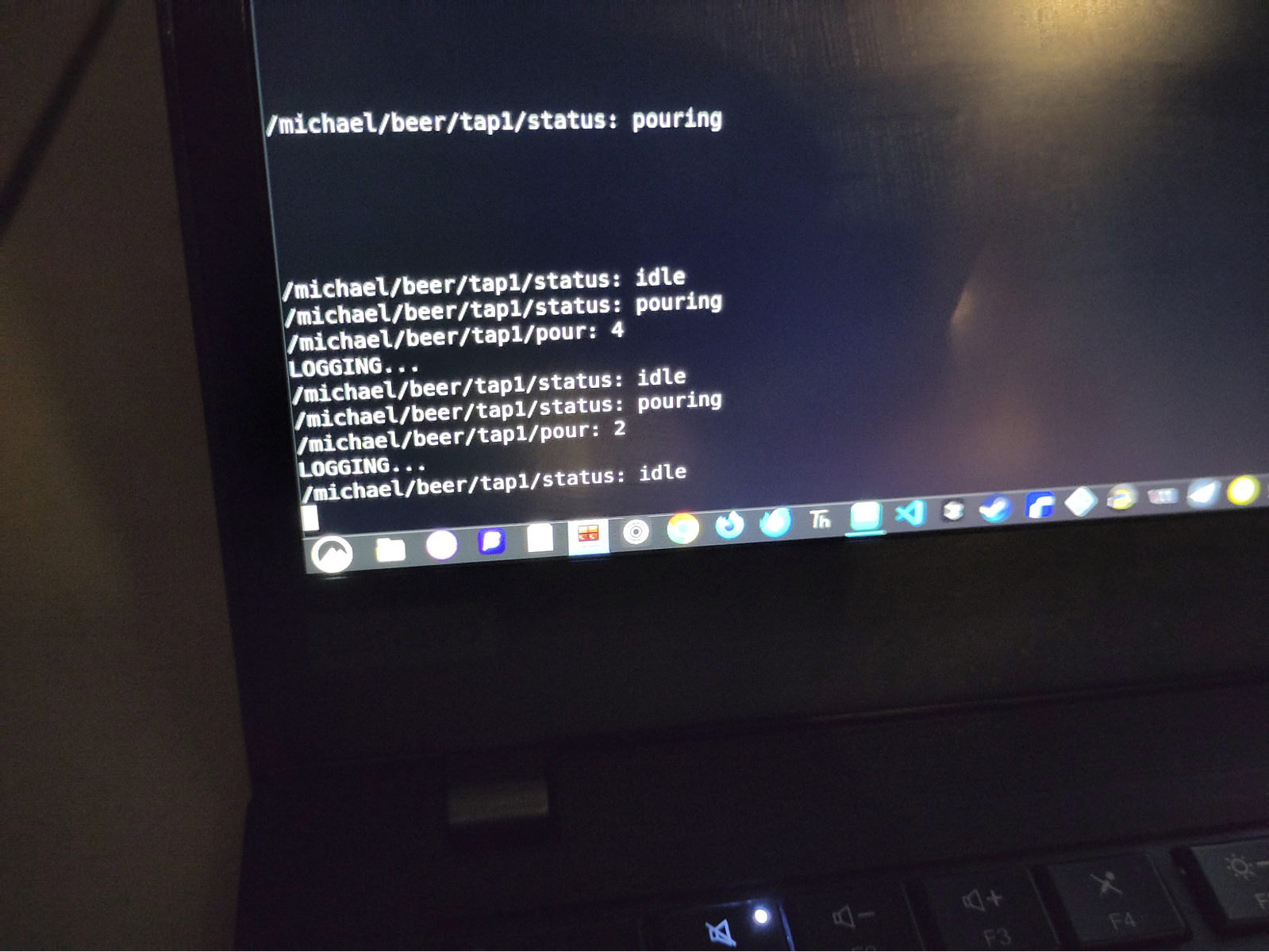
Here is me pouring 4 beers
image2.png17.1 KB
Changed naming
REF: ~/Adruino/esp32_c3_beer_monitor
Change the naming from
/beer/michael/tap1
To
/michael/beer/tap1
This makes more sense for the house as we can have /michael/weather_station/temperature etc.
Setup Reed Switch for Beer Taps
Physical Setup
Design
image9.png100 KB
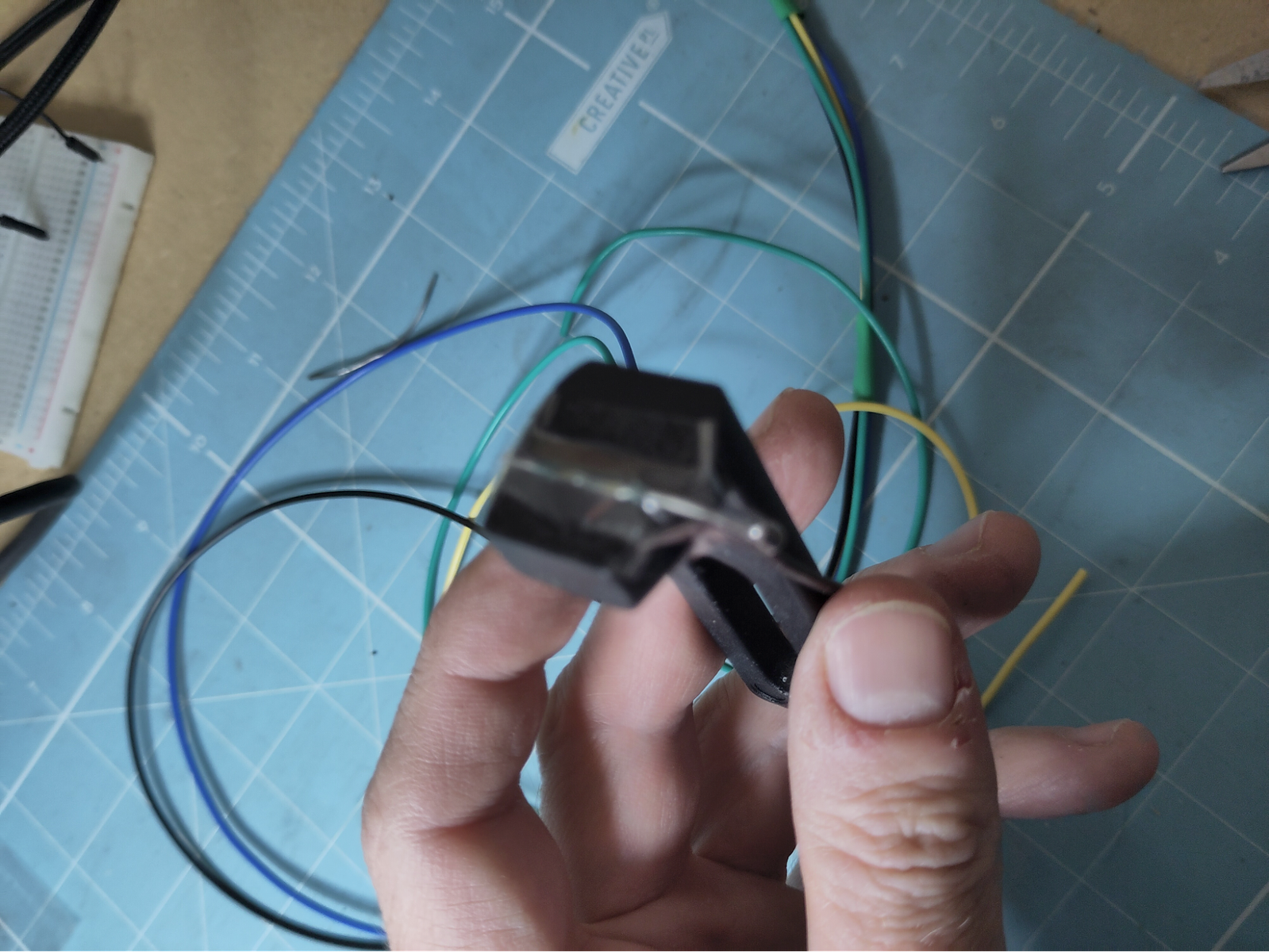
Bracket
image7.png6.86 MB
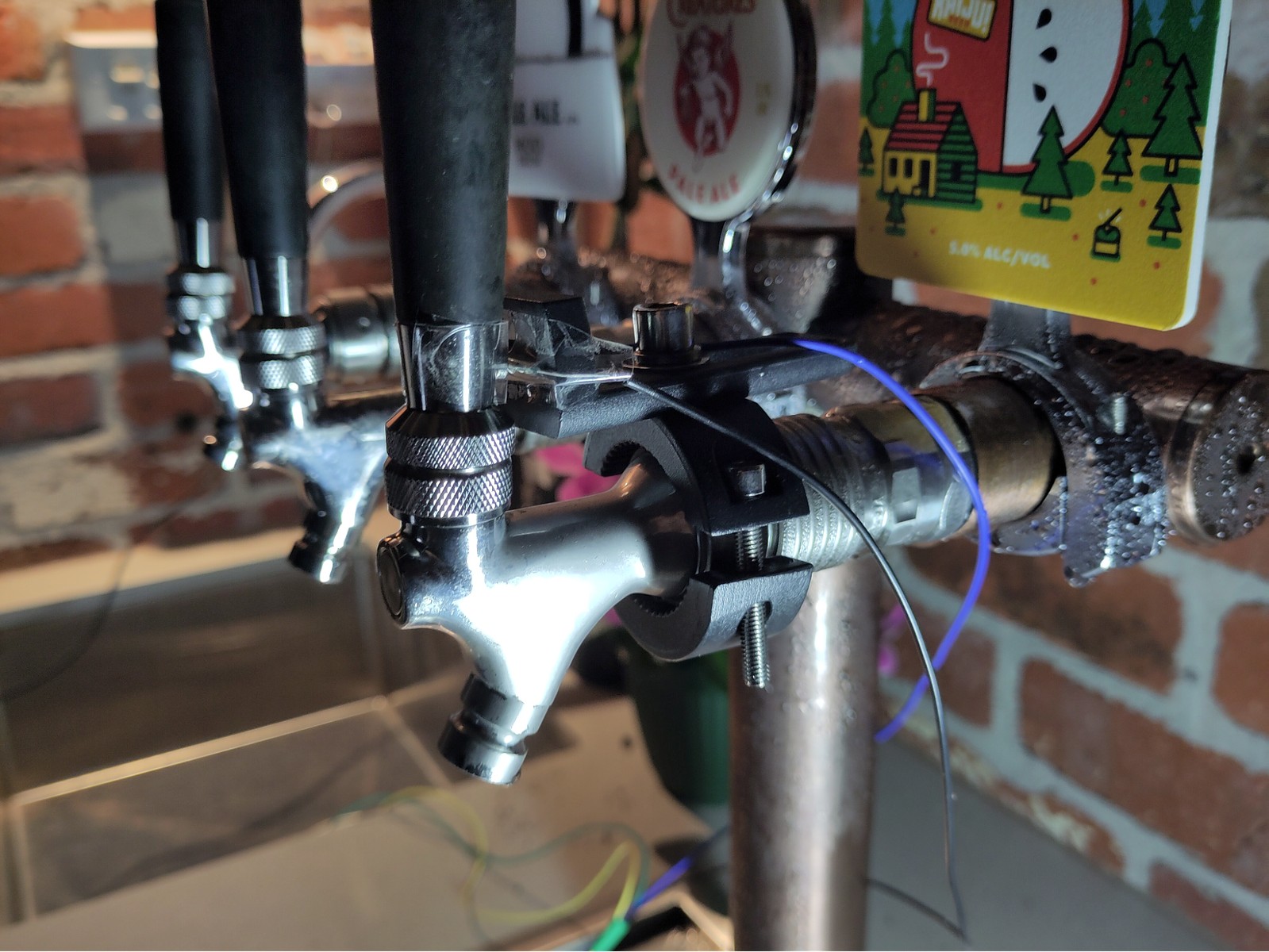
The end product installed
image4.png6.89 MB
Capturing over MQTT
image6.png4.83 MB
Reed sensor on the mount
image5.png5.81 MB
Hall Sensors
image1.png248 KB
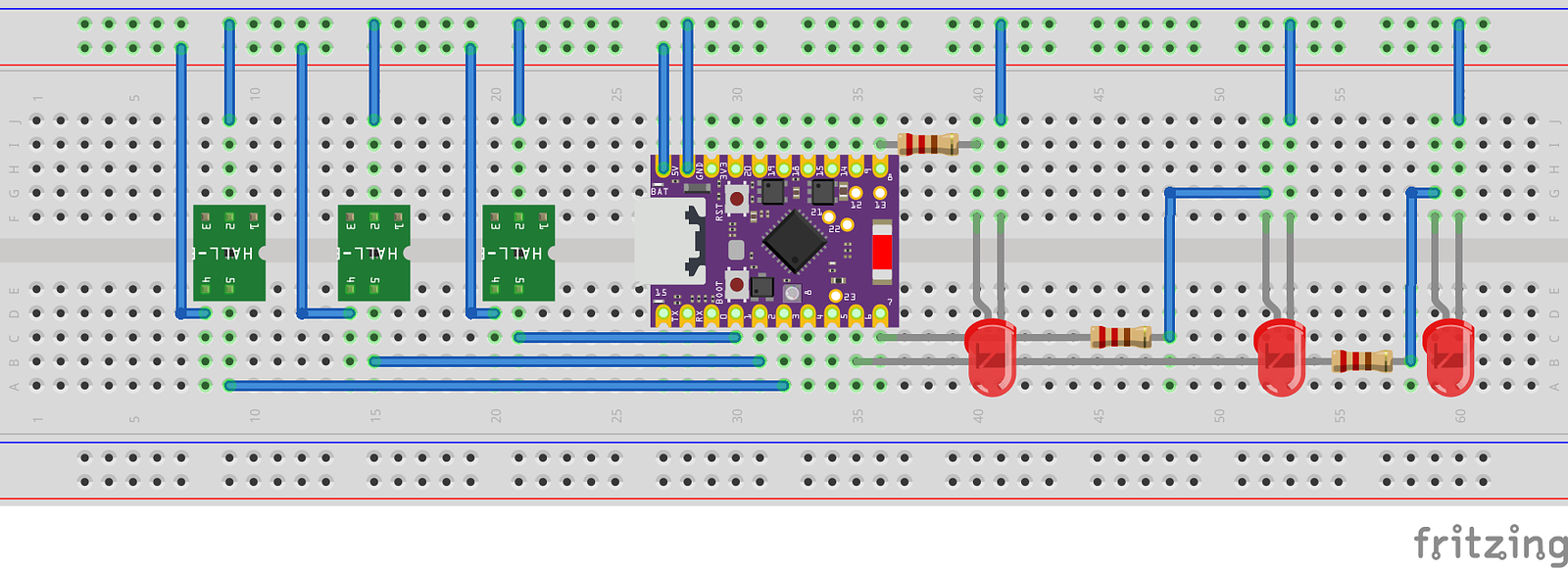
Hall sensors are connected like so;
ESP32
Hall Colour
VCC 5v
brown
GND
blue
Data (GPIO1,2,3 for taps 1,2,3)
black
Final layout of the circuit with hall sensors and LEDS;